Managing Cross-Subsidiary Payments in NetSuite: A Complete Guide

Managing cross-subsidiary payments in NetSuite can be a complex yet essential part of managing financials for businesses with multiple subsidiaries. Whether operating across regions or through various business units, understanding how to handle intercompany transactions and payments is critical for accurate accounting, financial reporting, and compliance. NetSuite simplifies this process with an integrated solution, streamlining intercompany payments and ensuring smooth financial operations.
Let’s dive into this guide to understand the steps involved in performing cross-subsidiary payments in NetSuite.
What is a Cross-Subsidiary Payment in NetSuite?
A cross-subsidiary payment refers to the transfer of funds between two different subsidiaries within the same parent organization. This usually happens when one subsidiary owes money to another due to internal transactions, such as the sale of goods or services between subsidiaries, which can occur in cases where the subsidiaries operate in different countries or regions. NetSuite’s intercompany management features allow businesses to easily handle these payments by providing a clear method for recording, reporting purposes, and reconciling payments between subsidiaries, ensuring both subsidiaries’ ledgers remain accurate and compliant.
Cross-Subsidiary Payment Process in NetSuite
NetSuite provides an intuitive process for managing cross-subsidiary payments, which involves a series of steps to ensure accurate transactions. The steps involve creating intercompany journal entries, processing payments, and handling currency conversions. Let’s walk through each stage of the process:
1. Set Up Intercompany Accounts and Preferences
Before initiating any cross-subsidiary payments, ensure intercompany preferences are correctly configured.
Steps:
Enable Features:
- Go to Setup —> Company —> Enable Features.
- Check “Automated Intercompany Management” checkbox to automate the creation of intercompany sales orders from purchase orders, reconcile intercompany transactions, and generate intercompany elimination journal entries.
- Check “Intercompany Cross-Subsidiary Fulfillment” checkbox to manage and fulfill orders and receive returns across multiple subsidiaries.
Set Up Intercompany Preferences:
- Navigate to Setup —> Accounting —> Intercompany Preferences.
- Under the Accounting tab, choose the default Receivables, Payables, Income, and Expense accounts to record intercompany transactions.
- These accounts will be used to record and post intercompany transactions across subsidiaries, and during period-end close, the elimination task automatically eliminates these intercompany accounts.
Set Up Intercompany Elimination Accounts:
- Go to Lists —> Accounting —> Accounts —> New.
- Enter a name and number for the account, select the account type, and choose the parent or top-level subsidiary, and check Include All Children.
- Check the “Eliminate Intercompany Transactions” box to make this an intercompany account.
The Intercompany Elimination Accounts allow for the consolidation of financial data at the parent level as this ensures that intercompany transactions are automatically eliminated during period-end close, maintaining accurate consolidated financial reports.
2. Creating Intercompany Journal Entries
Cross-subsidiary payments are linked to intercompany transactions in NetSuite. The system allows to create journal entries or bills as intercompany transactions, which will automatically generate corresponding entries in the accounts of both subsidiaries.
The process starts with the creation of an Intercompany journal entry, which records the financial impact of the transaction between the subsidiaries. This journal entry will include debit and credit entries that correspond to the accounts for each subsidiary involved in the transaction.
Steps to Create an Intercompany Journal Entry:
- Go to Transactions —> Financial —> Make Advanced Intercompany Journal Entries.
- Choose the subsidiary from which the transaction originates.
- Enter the debit and credit lines with the amount for the intercompany transaction.
- When entering journal lines, add the intercompany accounts and each line should correspond to an account of the subsidiary involved in the transaction.
- After we select intercompany accounts, NetSuite automatically flags the intercompany journal line with the “Eliminate” set to “Yes” to indicate that the transaction should be eliminated in consolidation.
- The system will validate the journal entry for balance. If the debits and credits are not balanced, an error will be displayed.
Let us take an example to better understand the creation of a Journal Entry-
Example-
When creating an intercompany journal entry in NetSuite, the process involves transferring funds between subsidiaries by utilizing specific accounts for each subsidiary involved. The journal entry is structured as follows:
- Debit from Originating Subsidiary Account:
The amount will be debited from the account of the originating subsidiary. This reflects the payment being made from one subsidiary to the other. For example, if the payment is related to Accounts Payable, the debit will be recorded in the originating subsidiary’s Accounts Payable account. - Credit to Intercompany Account:
On the second line, the same amount is credited to the Intercompany account. This account acts as an intermediary, holding the transaction temporarily between the two subsidiaries involved in the intercompany transfer. - Debit from Intercompany Account:
On the third line, the amount is debited from the Intercompany account, reflecting the transfer of funds from the intermediary account to the destination subsidiary’s account. - Credit to Destination Subsidiary Account:
Finally, the amount is credited to the appropriate account in the destination subsidiary’s ledger. This line reflects the transfer of funds to the receiving subsidiary, such as Accounts Receivable or another appropriate account.
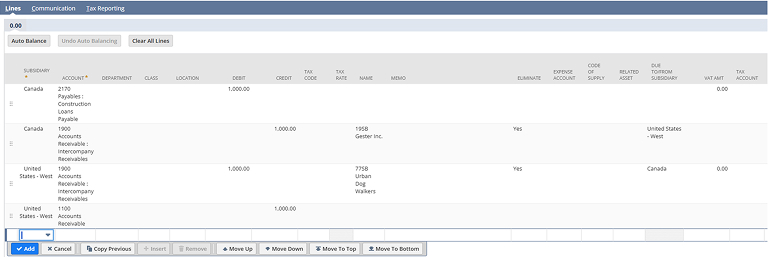
This structure ensures proper recording of intercompany transactions for both subsidiaries.
3. Performing Intercompany Eliminations
The intercompany elimination process in NetSuite ensures that intercompany transactions are removed during period-end close, for consolidating accurate financial reports. After a payment is made, intercompany eliminations are necessary to remove the effect of intercompany transactions, i.e., the payments made between subsidiaries from the parent company’s consolidated financial statements.
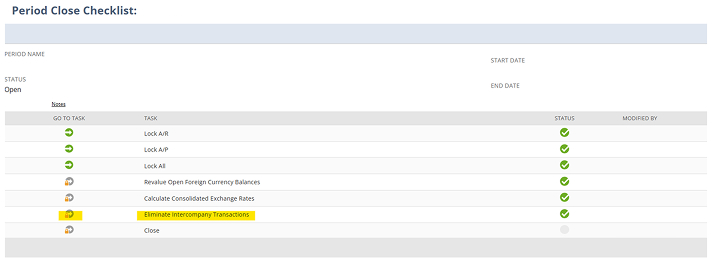
This process can only be initiated from the Period Close Checklist after completing all other period-closing tasks. NetSuite automatically generates the elimination journal entries when the elimination process is run.
Steps to Run Intercompany Elimination:
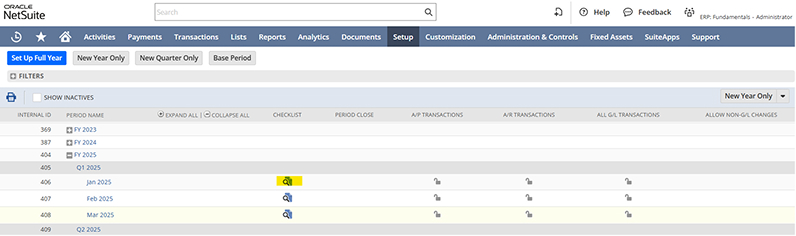
- Go to Setup —> Accounting —> Manage Accounting Periods —> Open the Period.
- Then in the Period Close “Checklist”, click the “Eliminate Intercompany Transactions” task icon.
- Click the “Run Intercompany Elimination”.
- Select class, department, location, and optionally add a memo.
- For businesses using Automated Intercompany Management, we can assign a default elimination location to each subsidiary and select the elimination subsidiary.
- Click Save to execute the intercompany elimination and post the journal entries for the period.
4. Reconcile Intercompany Accounts
After processing the cross-subsidiary payment, businesses must reconcile the transactions for intercompany accounts to ensure all records are accurate. NetSuite provides financial reports to help track cross- subsidiary payments including bank reconciliations, journal entries, and intercompany reports.
Steps:
- Go to Reports > Financial > Intercompany Reconciliation.
- Review the balances of intercompany accounts and verify them by matching payments and transactions between subsidiaries.
Features of Cross-Subsidiary Payments in NetSuite
- Streamlined Financial Management: NetSuite simplifies the management of financial transactions between subsidiaries, enabling businesses to easily handle intercompany payments, reducing complexity and ensuring smooth operations.
- Accurate Financial Reporting: It ensures that intercompany transactions are accurately recorded and eliminated during period-end close, which supports accurate consolidated financial statements and reduces the risk of errors in reporting.
- Multi-Currency and Multi-Subsidiary Support:
NetSuite’s robust features support multi-currency transactions, making it ideal for global businesses as it ensures seamless financial operations between subsidiaries located in different countries, automating currency conversions and eliminating intercompany exchange rate discrepancies. - Automated Intercompany Elimination:
The system automates the intercompany elimination process, ensuring that intercompany transactions are removed from consolidated financial reports during period-end close. This eliminates the need for manual adjustments and ensures compliance with financial standards.
Conclusion
Cross-subsidiary payments in NetSuite can significantly simplify the management of financial transactions between subsidiaries within a corporate group. With features like multi-currency support, intercompany journal entries, automated tax compliance, and comprehensive reporting tools, NetSuite enables businesses to efficiently manage their cross-subsidiary payments process. By following the correct setup and processes, companies can maintain accurate records, ensure compliance, and improve financial transparency across subsidiaries. Whether you are managing small or large-scale international operations, NetSuite’s intercompany functionality helps keep your financial transactions organized and compliant.

From Strategy to Delivery, on time every time.